Seriously, let’s pause the excitement for a minute.
You’re completely ready, right? You’re buzzing with that anticipation—the prayer list is ready, the routes are mapped, and you’ve probably invested in some seriously warm, mountain-ready gear. That glorious Chardham Yatra feeling? It’s absolutely electric!
But before we debate the merits of thermal leggings versus wool, we have to talk about the single most critical, often maddening step that can literally halt your trip: Getting Registered on the Uttarakhand Government Portal.
Look, I know. Navigating a government website feels like stepping into a bureaucratic nightmare—a maze of confusing buttons and forms that seem designed to waste your time. This registration process is, hands down, the biggest pre-trip headache for everyone who attempts it.
However, here is the absolute truth: This step is mandatory. You cannot skip it.
And it’s not an arbitrary rule; it’s a rule of love. This system, tragically put into place after the 2013 floods, is your safety blanket. It exists to track pilgrim movement, prevent the deadly threat of overcrowding, and, most importantly, ensure that if there’s a crisis—a sudden landslide or severe weather—the authorities know exactly who you are and where you are located. This is your security, plain and simple.
So, ditch the frustration. I’m taking you by the hand and walking you through this process. We’re turning this necessary chore into the easiest task you’ll tick off your list.
Why This “Paperwork” is Non-Negotiable (Your Ticket Past the Gatekeepers)
Let me be perfectly honest: If you aren’t registered, they will turn you away. You will encounter physical roadblocks—at Sonprayag for Kedarnath, at the helipads, and right outside the temple gates. Finishing this now is the only way to avoid a full-blown mountain meltdown later.
Pre-Flight Check: Gather Your Digital Essentials
Seriously, do not click on the government site until you have all of this stuff organized in a single folder. Trust me, having it ready makes the whole process less than 15 minutes!
Your Chosen ID
Grab one crystal-clear scan or photo of your go-to government ID. Whether it’s your Aadhaar, Voter ID, PAN, Passport, or Driving License—just pick one, and make sure the picture is clean!
Your Face
A recent, clear passport-style photo of yourself. You need to upload this!
Your Contact Info
Your working mobile number and email address are vital! They are sending all the critical OTPs and your final registration pass right here.
Your Emergency Contact
Think of a loved one who is definitely NOT traveling with you and have their name and phone number ready. It’s the lifeline in case of an emergency.
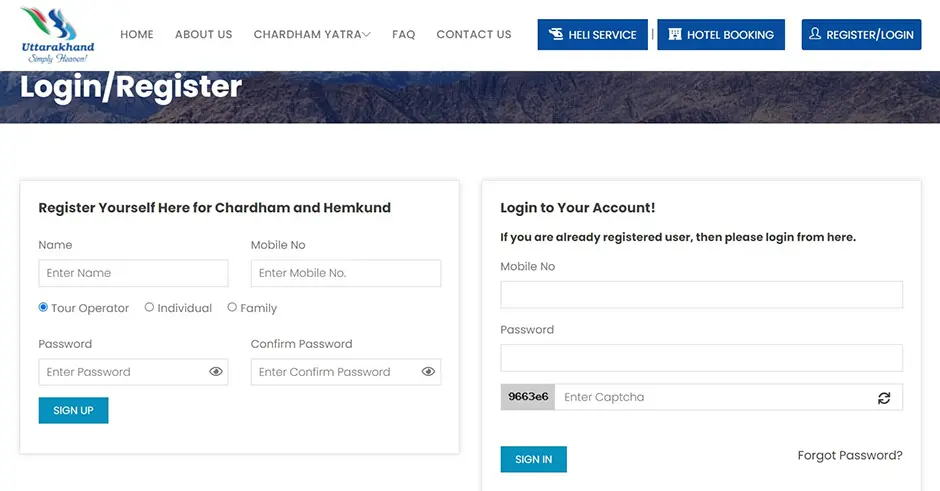
Option 1: The Absolute Best Method for Chardham Yatra Registration
The fastest, cleanest, most seamless way to get your registration done. Go straight to the official source: registrationandtouristcare.uk.gov.in
(Bookmark it right now, and for the love of the Himalayas, always verify the spelling to avoid those nasty scam sites!)
Step 1: Get Verified (The Mobile Handshake)
First Visit? Look for the ‘Register/Login’ button.
Basics: Type in your full name and your mobile number. Ready for the buzz? The system will immediately ping an OTP (One-Time Password) to your phone. Pop that code in to prove you’re real!
Set Your Password: Once verified, set a strong password. Remember it! Your phone number is now your official login.
Step 2: Map Out Your Mission (The Tour Plan)
Log In: Use your verified mobile number and password.
Start Planning: Find the button to create or manage your tour plan.
Name Your Trip: Keep it simple—something like “May 2026 Pilgrimage” works perfectly.
The Critical Dates: You absolutely must plug in your expected date of visit for each Dham you intend to visit (Yamunotri, Gangotri, Kedarnath, and Badrinath).
A Note of Calm: Look, your dates might shift due to mountain weather. Don’t stress too much! You can usually tweak these slightly later on the dashboard, but you need an initial plan locked in now.
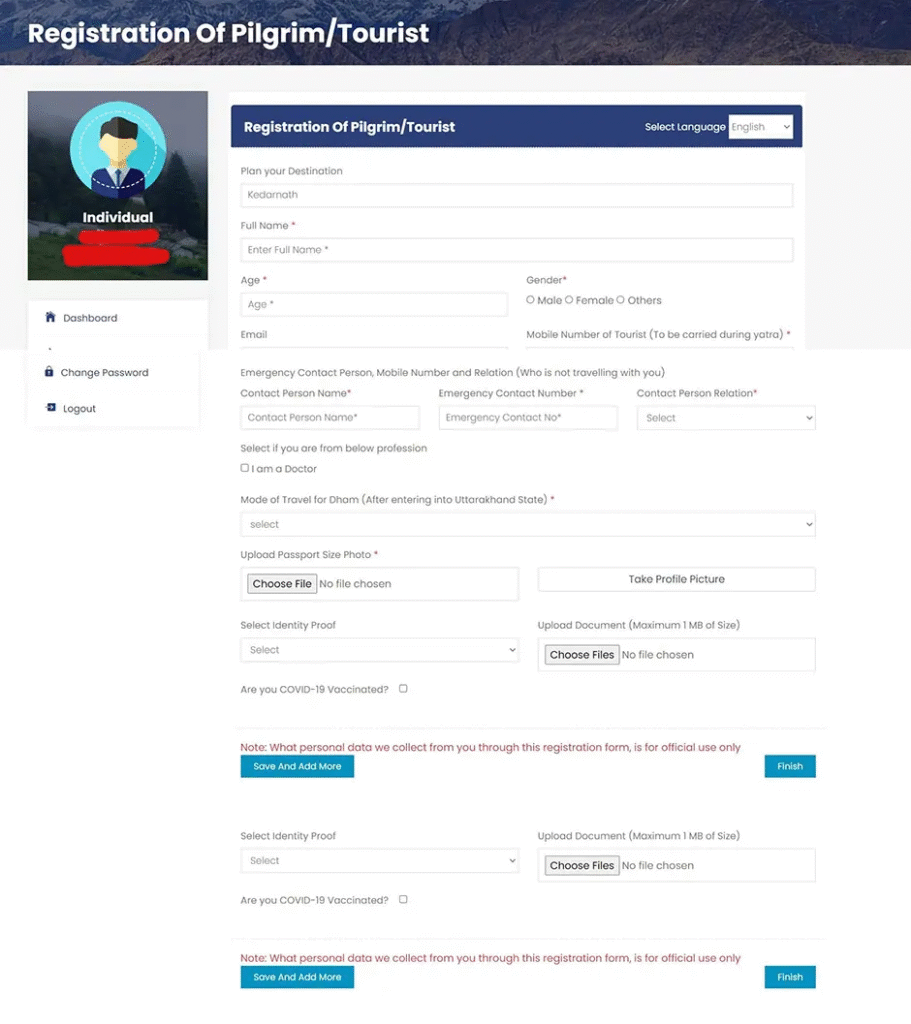
Step 3: Introduce the Pilgrims (The Group Roster)
Fill in the Blanks: Now, you enter the necessary personal data for every single traveler—age, gender, address, and how you plan to travel (road or helicopter).
Upload Your Proof: This is where you attach that digital photo and the scan of your chosen ID. The website might throw you a quick security check by asking for Aadhaar verification—just follow the instructions carefully!
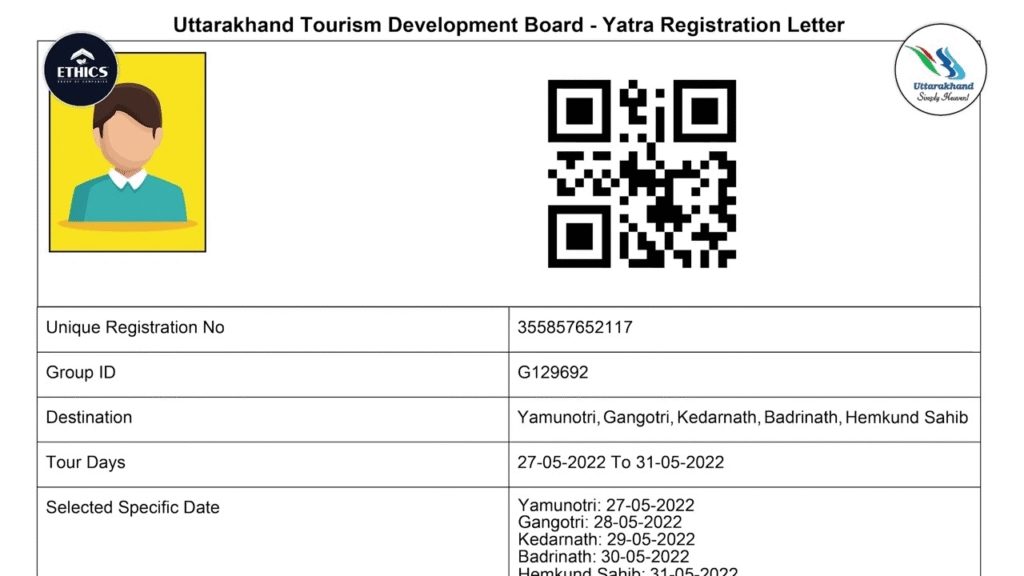
Step 4: Claim Your QR Code (Your Prize!)
Hit Submit! Take a deep breath. Once all details are saved, click the final submission button. You’re done!
Confirmation: You’ll receive a unique Registration Number via SMS and email right away.
Download Your Pass: Go back to your dashboard and download the official Yatra Registration Letter. That beautiful little document with the QR code is your pass!
Option 2 & 3: Chardham Yatra Registration on the Fly (App & WhatsApp)
If you are just happier doing things on your phone, the government has you covered:
Mobile App
Just download the official Tourist Care Uttarakhand app (available on all major stores). The steps are exactly the same, but the interface might feel a little easier to manage on a phone screen.
WhatsApp Registration
This is arguably the easiest method!
Save this official number: +91 8394833833
Simply send the word “YATRA.”
The system takes over, guiding you through the essential questions via chat—it’s super direct, quick, and completely official.
If you don’t want to stress on anything else you can contact tour and travel companies like The Mountain Trekker who will take care of everthing from stay to registarions and everything else etc,.
Option 4: In-Person
You can register in person at official counters.
You’ll find these counters set up at major entry points, usually at Haridwar (Railway Station/Rahi Motel) and Rishikesh (ISBT/RTO Office).
And closer to the Dhams: Keep an eye out for official counters in places like Sonprayag (for Kedarnath) and Janki Chatti (for Yamunotri).
Golden Rule Checklist after Chardham Yatra Registration
- Print Everything: Carry at least three physical printouts of your Yatra Registration Letter (that QR code is your magic key!). You will be asked to show it repeatedly.
- Original ID Only: Do not forget the exact, original, physical ID (Aadhaar, Passport, etc.) you used for the registration. Authorities must verify it against your pass!
- Keep a Digital Backup: Store a clear photo or PDF copy on your phone as a backup, just in case.
And That’s It!
Registration complete!
If you loved reading about Chardham Yatra Registration you might also like Do Dham Yatra.





Leave a Reply